test1
 </img>
 </img>
Holy Unblocker LTS (v6.x.x)



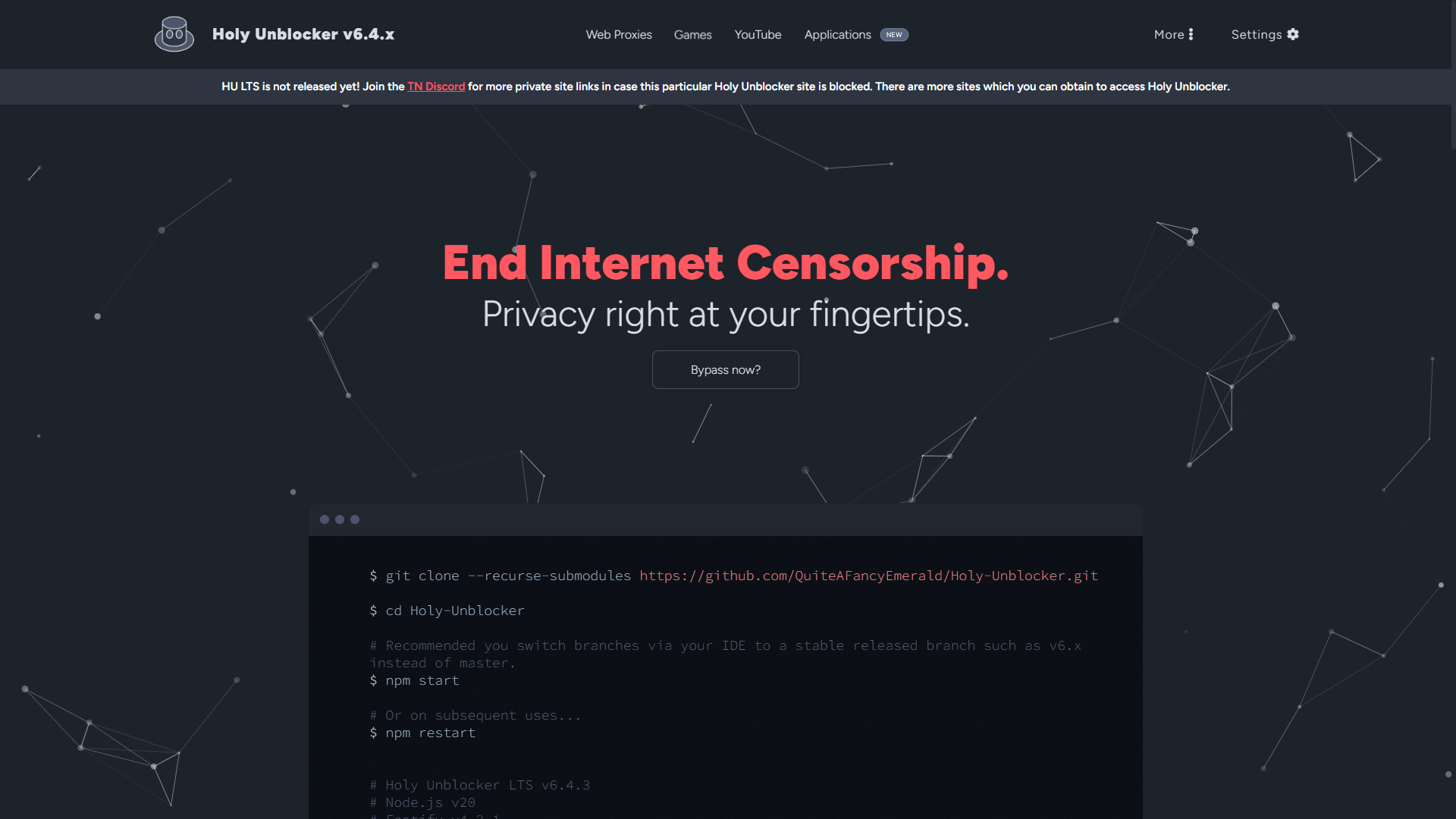
Holy Unblocker LTS is an experimental web proxy service that can bypass web filters or “blockers” regardless of whether the method of censorship is client-side or network-based. This includes the ability to bypass content blockers from governments, chrome extensions, localized client firewalls, and network-related filters. The project even allows the ability to browse Tor/Onion sites in any browser (even Chromium) all through a website!
You can support Holy Unblocker by starring the repository!
This project serves mostly as a proof of concept for the ideal clientless solution to bypassing censorship. A good use case of this project would be if you ever needed a clientless solution to use Tor or leave minimal traces of device activity. Simply host this project on any domain and have an alternative solution to a VPN without needing to download anything on said device. Being a secure web proxy service, it supports numerous sites while being updated frequently and concentrating on being easy to self-host. Holy Unblocker LTS works with a large number of sites, including YouTube, Discord, GeForce NOW and more! Also has a good amount of locally hosted games featured on the site.
Over 30M+ users since 2020. Thank you so much for the support I could have never imagined how massive the web proxy community has become.
Current Branch: Latest
Branch Types
- Latest (master; built for FOSS and SEO) - Beta (pending changes; changes that may break things) - Production (v4, v5, v6; stable version of Holy Unblocker LTS. Changes for self hosting in production settings; max filtering evasion and request handling)Considering switching branches for self-hosting to a production branch!
View the self-deployment options if you wish to self host this project. Can’t deploy using any of the free options? Check out Railway or look into cheap, paid VPS hosting solutions. If you don’t wish to self-host join the discord for more official instance links that are restocked frequently.
Be sure to join Titanium Network’s Discord for more official site links: https://discord.gg/unblock
[!CAUTION] If you are going to self-host Holy Unblocker LTS please switch to the PRODUCTION branch for filter evasion features enabled automatically. The master branch will feature work-in-progress changes that are not ready for self hosting. If you wish to contribute to this project however please PR to the master branch.
[!TIP] Holy Unblocker LTS is optimized for self-hosting to provide you with maximum privacy control! Fork this repository and consider starring. You can self-host using either free or paid deployment options, or set it up on a dedicated instance (VPS) for enhanced performance.
| Supported Sites | Features |
|---|---|
| Youtube | Built-in variety of open source web proxies with both a focus on speed and/or security |
| Features Source Randomization and DOM Masquerading to circumvent major filters effectively along with randomizations to proxy globals | |
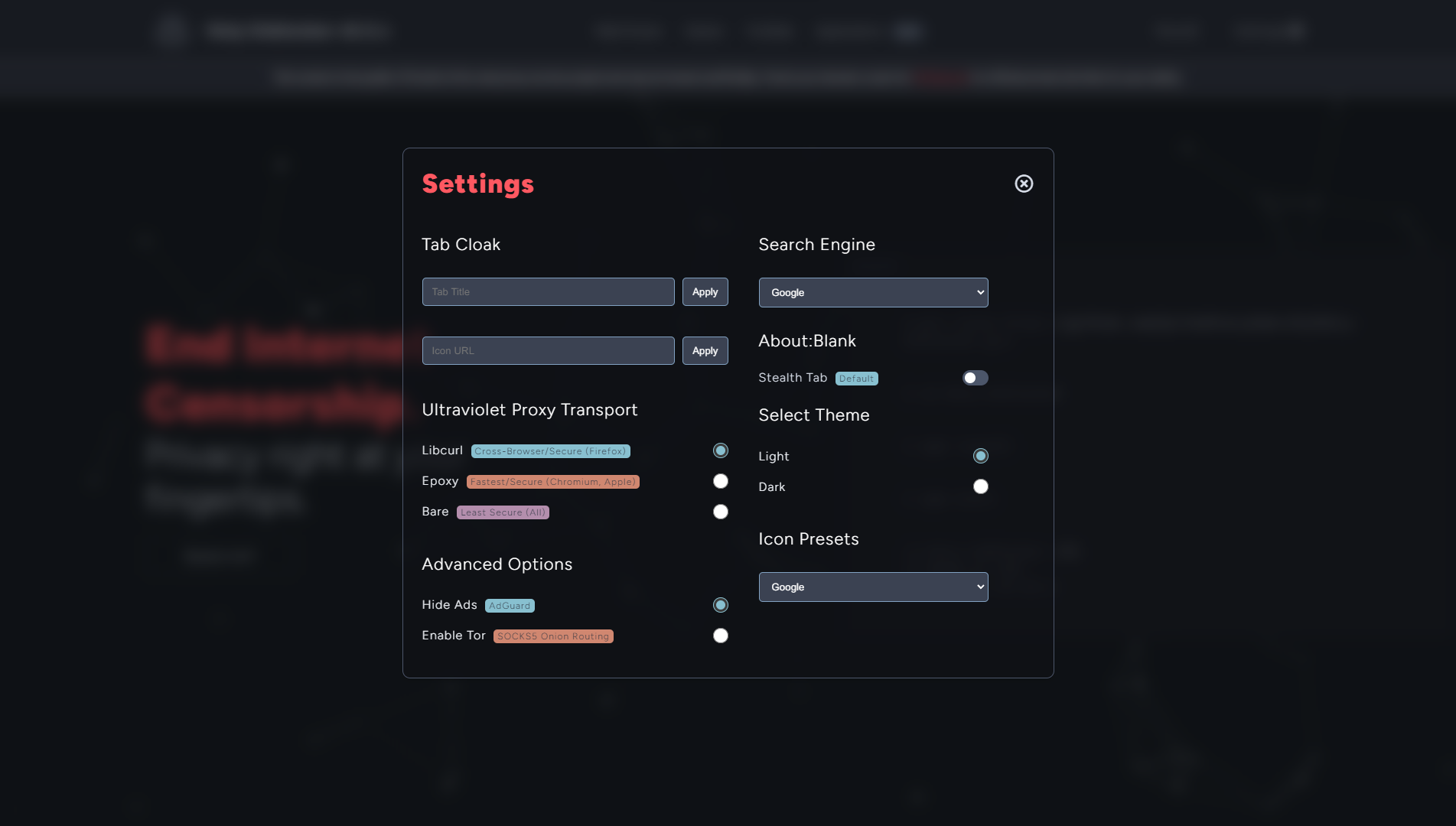
| Discord | Tab title + icon customization using the Settings Menu for improved browsing history stealth |
| Adblocking support across all websites while surfing and low latency DNS on official servers | |
| Reddit.com | SOCKS5 and Onion routing support with Tor within the Settings Menu. Use Tor/Onion sites in any browser! |
| GeForce NOW | Game library with moderately decent titles and open-source emulation projects |
| Spotify | Bypass regional proxy blocks by swapping regions or enabling Tor |
| And essentially all sites! | Built for intensive production loads and ease of setup |
 </img>
 </img>
Deploy Holy Unblocker
Free Deployments


Alternative Free Sources
[](https://app.cyclic.sh/api/app/deploy/shuttlenetwork/shuttle) [](https://render.com/deploy?repo=https://github.com/QuiteAFancyEmerald/Holy-Unblocker) [](https://fly.io/launch?repo=https://github.com/QuiteAFancyEmerald/Holy-Unblocker)Production Paid/Free Options (Requires Payment Info)


What happened to Replit/Heroku Deployment?
Replit is no longer free and Heroku has a set policy against web proxies. Try GitHub Codespaces or Gitpod instead for development on the cloud OR Koyeb for free hosting.
GitHub Codespaces
Setup Instructions
- Fork (and star!) this repository to your GitHub account - Head to the official Codespaces website (ensure you have a GitHub account already made) - Select **New Codespaces** and look for _[USERNAME]/Holy-Unblocker_ on your account - Ensure the branch is set to `master` and the dev container configuration is set to **Holy Unblocker LTS** - Select **Create Codespace** and allow the container to setup - Type `npm run fresh-install` and `npm start` in the terminal - Click "Make public" on the application popup, then access the deployed website via the ports tab.Partners
Table of contents:
- Setup
How to Setup
It is highly recommended you switch branches via your IDE to a production released branch. Often the master branch contains unstable or WIP changes.|
Example: v6.x_production instead of master
Terminal
Either use the button above to deploy to the deployment options above or type the commands below on a dedicated server
THIS PROJECT REQUIRES NGINX NOT CADDY.
Please ensure you are using Node 20.x as well:
git clone https://github.com/QuiteAFancyEmerald/Holy-Unblocker.git

cd Holy-Unblocker

# Edit config.js and set production to true if you want to use pm2 (Allows for easier VPS hosting)
npm run fresh-install
npm start

# Or on subsequent uses...
npm restart

# For killing any production processes made with pm2
npm run kill

# For clearing respective Rammerhead cache
npm run clean

# If you encounter any build errors...
npm run build

# If you encounter any service errors...
npm run test
This website is hosted locally with Scramjet, Ultraviolet (Wisp, Bare-Mux, EpoxyTransport, CurlTransport) and Rammerhead built-in.
For security reasons when hosting with a reverse proxy PLEASE use NGINX not Caddy. This is due to wisp-js using loopbacks.
Detailed Setup (Ubuntu Example)
You will need Node.js 20.x and Git installed; below is an example for Debian/Ubuntu setup.
Resources for self-hosting:
- https://github.com/nvm-sh/nvm
- https://docs.titaniumnetwork.org/guides/nginx/
- https://docs.titaniumnetwork.org/guides/vps-hosting/
- https://docs.titaniumnetwork.org/guides/dns-setup/
Configuration
Server Configuration Setup
The default PORT for the proxy when started is http://localhost:8080. You can change the PORT and other production metrics if needed in ./ecosystem.config.js.
The default PORT for Rammerhead is 3000. You can change this here.
Every other localized changes for source randomization, auto-minify, etc. are located in ./config.json.
config.json
minifyScripts: Automatically minify respective static assets upon starting the server.randomizeIdentifiers: Enable experimental proxy global randomization for Ultraviolet. This reduces the chances of UV being detected by any extension based filters.production: Utilize a pre-configured production setup for server hosting. Automatically has cache control, session jobs for Rammerhead and source rewrites setup.disguiseFiles: Enable DOM masquerading which obfuscates real the real content fetches for HU LTS. This is done through disguising requests, decompressing and then reconstructing the DOM tree.usingSEO: Enable Source Randomization which randomizes the source by swapping chunks of data specified in./src/data.json. Highly useful for masking keywords that will automatically flag or block Holy Unblocker LTS as well as preventing source blocks.
Tor/Onion/SOCKS5 Routing Setup
You need to setup Tor (no GUI need/GUI is alright. With GUI replace port 9050 with 9150) in order for the Onion Routing setting to work!
Simply host Tor using this guide: https://tb-manual.torproject.org/installation/
Alternative Guide (for CLI): https://community.torproject.org/onion-services/setup/install/
If you are hosting Holy Unblocker LTS on a VPS utilizing Ubuntu consider attaching Tor to systemctl for easier production management. Once Tor is up and running on either Linux or Windows it will work automatically with Holy Unblocker LTS when enabled by the user via the Settings menu.
If you wish to use a custom HTTP/HTTPS/SOCKS5 proxy to route all traffic through for Scramjet and Ultraviolet this is handled in ./views/assets/js/register-sw.js. Modify proxyUrl with the respective protocol and address. This is done via the proxy option for Wisp. You can change the cases as needed.
  proxyUrl = {
    tor: 'socks5h://localhost:9050',
    eu: 'socks5h://localhost:7000',
    jp: 'socks5h://localhost:7001',
  }
Proxy Configuration
The primary location for tweaking any web proxy related settings assigned via the Settings menu is ./views/assets/js/register-sw.js. Here you can modify the provided transport options set locally via a cookie, swap out SOCKS5 proxies, change Onion routing ports, specify a blacklist, and more.
stockSW: The default service worker configuration file for Ultraviolet. For Holy Unblocker however adblocking is automatically enabled so this is not used by default.blacklistSW: A modified version of Ultraviolet that allows for blacklisting domains and adblocking.proxyUrl: Specifies a SOCKS5/HTTPS/HTTP protocol URL defaulting to the default Tor proxy port. This can be swapped out with any valid port or SOCK5s proxy. This is done via the proxy option for both epoxy and libcurl.transports: Specifies any provided ports to be swapped via Bare-Mux and utilize Wisp.wispUrl: Modify the pathname or url handling for WispdefaultMode: Specify the default transport used globally (can be swapped by the users still via the Settings menu)ScramjetController: This constructor allows you to swap out the prefix used for Scramjet dynamically and specify file locations. Note you may need to edit./views/scram/scramjet.swwhen changing file names.
Client Navigation Configuration
The primary location for any client side navigation scripts is ./views/assets/js/common.js. This file is primary used for Omnibox (Search Engine) functionality, swapping proxy options and linking games.
getDomain: This constant is used for specifying any subdomains to remove when appending a URL into the omnibox.goFrame: This specifies the stealth frame used for Holy Unblocker LTSsx: This constant specifies the search engine you want to be proxied whenever a user types something in that isn’t a URLsearch/uvUrl/sjUrl: These functions specify and parse the queries used for submitted URLsRammerheadEncode:This constant is a dependency for Rammerhead parsing and queryingurlHandler/asyncUrlHandler: Used to set functions for the goProx object.goProx: This constant allows for the mapping of URL handling for specific proxies, games or links that need to fall under a web proxy.
const goProx = Object.freeze({
  ultraviolet: urlHandler(uvUrl),

  scramjet: urlHandler(sjUrl),

  rammerhead: asyncUrlHandler(
    async (url) => location.origin + (await RammerheadEncode(search(url)))
  ),

  // `location.protocol + "//" + getDomain()` more like `location.origin`

  examplepath: urlHandler(location.protocol + `//c.${getDomain()}/example/`),

  examplesubdomain: urlHandler(location.protocol + '//c.' + getDomain()),

  example: urlHandler(sjUrl('https://example.com')),
});
prSet: Attaches event listeners using goProx for any buttons or inputs needed
// prSet function code here....

prSet('pr-uv', 'ultraviolet');
prSet('pr-sj', 'scramjet');
prSet('pr-rh', 'rammerhead');
prSet('pr-yt', 'youtube');
prSet('pr-example', 'example');
huLinks/navLists: Automatically takes paths stated in./views/assets/jsonand appends them depending on the page and usage. This is used for hiding links that would lead to filter blocks and create an easier system for adding games.
Games Management
As stated above all game links that need to be appended to a page (including images and descriptions) are managed via the nav files in./views/assets/json.
Download the latest release here and extract it within a folder called /views/archive.
views/archive/g: Contains any local or external HTML5/web games.views/archive/gfiles/flash: Contains Ruffle (an Adobe Flash emulator) and a collection of flash games linked to an external CDN.views/archive/gfiles/rarch: Contains webretro which is a project that ports RetroArch to WASM. Supports many systems like GBA, N64, etc; ROMS are NOT INCLUDED.
Structure
Web Pages
### Structure Information - `/views/`: The physical site base of Holy Unblocker goes here where static assets are served. - `/src/`: For future implementation of obfuscation and keyword removing features. #### Details of `/views/` - `/dist/` is used for minfied files. Created on build. - `/pages/` is used for the HTML for the site. - `/assets/` is used for storing various CSS, JS, image, and JSON files. - `/scram/` contains the respective local Scramjet implementation. Some files are overridden by the node module. - `/uv/` contains the UV implementation. #### Scripts located in `/views/assets/js/` - `card.js` adds a fancy visual effect to the box cards displayed on the welcome screen. - `common.js` is used on all pages and allows most site features to function such as autocomplete. - `csel.js` manages the settings menu, omnibox function and other additional features. - `loader.js` is used as an asset for DOM masquerading. - `register-sw.js` creates and manages service workers that allow Ultraviolet to function, and also uses bare transport.Future Additions
This is our nonexhaustive todo list for Holy Unblocker LTS v6.x.x and above. Release for production will be v7.x.x and above.
Vague Explanation for Beginners With External Proxies and Hosting
You will first want to host your proxies locally or externally.
List of some good hosting options:
- Crunchbits ( Current Hosting Provider)
- Greencloud (Paid)
- Oracle Cloud (Free, Paid, Dedicated)
- Azure (Free and Paid)
Out of the list of hosting providers Dedipath and Azure rank first as a preference. You may also self-host.
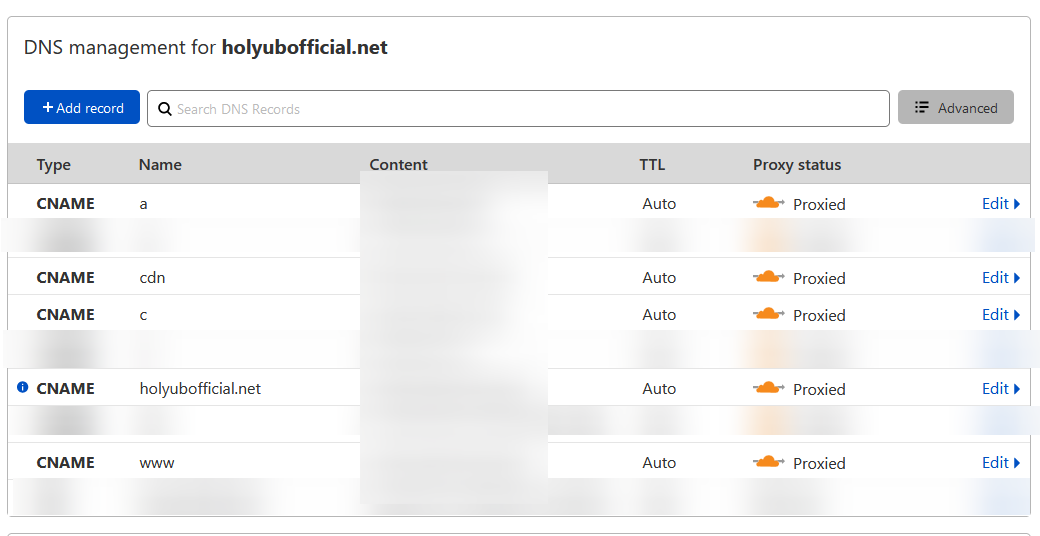
After you have selected a decent VPS, use Cloudflare for the DNS records for both the site and the subdomains for the proxies.
This is an example of DNS records. Self-hosting will require A records preferably.
 </img>
@andwww.example.comare being used for Holy Unblocker LTS.a.example.comis being used for other instances like Libreddit, Invidious or web ported games depending on what the site maintainer needs.
As stated previously, Holy Unblocker is hosted locally with Scramjet, Ultraviolet and Rammerhead out of the box. No need for external instances.
Domain Steps
- If you prefer to obtain premium domains (TLDs) then use Porkbun, which offers domains for amazing prices. Literally a
.orgdomain normally costs around $5 first year.
Cloudflare Steps
- Use Cloudflare (make an account), add your site and then add your various DNS targets to Cloudflare. Make sure you add Cloudflare’s Nameservers which will be given later when you are adding your site.
Make sure they are CNAME although A records also work and try to follow this structure:
| **Type | Name | Target** |
A | @ | VPS IP GOES HERE
A | www | VPS IP GOES HERE
A | a | VPS IP GOES HERE
Make sure HTTPS is forced and have SSL set to Flexible (if you don’t use LetsEncrypt). Otherwise you can have SSL set to Full.
Workspace Configurations
Preferably if you have your own device use Visual Studio Code. Pretty much the best option you can get but obviously this is an opinion. Also make sure you have Node.JS installed on your machine.
Not going to go too in depth with this part but first fork this repository. The clone it locally through a Terminal of some sort depending on what OS you are on. Make sure you navigate to the folder you want to set this up in.
git clone https://github.com/QuiteAFancyEmerald/Holy-Unblocker.git

cd Holy-Unblocker

npm run fresh-install

# If you wish to start the project

npm start

# For testing endpoints and errors

npm run test
Now simply add the folder you cloned this repo in in VSC. Then run npm install. I recommend that if you are releasing this publically on GitHub that you add a .gitignore in your root directory with the following exclusions:
node_modules
Now you have your following workspace environment setup. To deploy the following workspace you just created you will need to look up depending on your hosting provider.
For an online IDE that you can use on your school computer and/or chromebook use GitPod. Basically the equivalent of Visual Studio Code but with in-browser support.
- Make an account:
https://gitpod.io/ - Fork this repo and enter in this URL to setup your workspace:
https://gitpod.io#https://github.com/YourNameHere/Holy-Unblocker/
Use the same steps above by running npm install in your repository and adding a .gitignore in your root directory specifying to exclude node_modules.
Detailed FAQ
Quick FAQ
#### Where can I find the games for this repo? (404 errors, etc.) Due to piracy concerns, size, etc. this has been moved over here. EmuLibrary is not featured in the public version. **Why is the site I am on not working correctly or having CAPTCHA errors?** Captcha support is spotty on all of the current proxies sadly. It is primarily supported by Scramjet. Therefore some sites may not work with any of the sites. **I am getting 502 errors. What do I do?** When this happens you may either switch sites to fix the error or wait a bit. Sometimes clearing your cache can help. If you still have any questions feel free to ask them in the discord linked here.Why are official domains now numbered? Is this project maintained again?
Yes, this project is active again for LTS support! However, the approach is now much simpler to ensure functionality: domain restocks as needed and a highly maintained source. More than ever, this project serves as a proof of concept for the brave souls willing to innovate in the web proxy service space.
Former Closing Message (Original - 2022)
This isn’t the greatest announcement sorry. After lots of thought and severe hesitation I’m shutting down Holy Unblocker and leaving TN. It's just been something that I’ve been super conflicted with for months hence the lack of updates and the massive gaps that happened last year. I just didn’t want to throw away a project that I passionately enjoyed and spent time on while making amazing friends and meeting epic devs here. I could go on forever for who these people are but ima like leave it here. They know who they are :D The main change of thought is that I’m finally just putting an end right now due to 1) the lack of motivation 2) the community is NOT the greatest at time and not the nicest at times (have to put that out here) 3) the future doesn’t look so good for HU/TN as a project. Some things I’ll be keeping secret since there are more reasons to this choice unless otherwise for those who don’t find this enough information. Good friends here will know that I’ve been super stressed about this choice for months now. Also regardless a good motivator for this choice is the fact that I’ll be graduating soon. It’s possible that I may continue/come back for this in the future or keep it on GitHub only. I leave this here because even now I am still doubting myself about this change. But for now I’d check out other proxy sites like Incognito (Duce DOES a ton of updates frequently and he is the creator/developer of Ultraviolet so give him some love) :yayy_hopi: Check out his Patreon also! For current HU patrons you will not be billed next month and the HU Patreon will be archived so head over to Duce’s patron so he can purchase more domains for Incognito. With love <3 Emerald :HuTaoHype:More Information
This project is maintained by the Holy Unblocker LTS team and is an official flagship Titanium Network web proxy site.
View the official website for more detail and credits.
Web Proxy Sources:
This project currently uses Scramjet and Ultraviolet as web proxies adhering to the Wisp protocol. Bare-Mux is utilized for swapping transport systems to be utilized with Wisp. The included transport systems are EpoxyTransport and libcurl-transport. Rammerhead is also provided as an additional web proxy option.
- Scramjet
- Ultraviolet
- Wisp-Server-Node
- Wisp-Server-Python
- EpoxyTransport
- libcurl-transport
- Bare-Mux
- Rammerhead
- DetectorDetector
- The Freedom Project (Hard Fork)
Other Dependencies:
- tsparticles
- fastify
- @fastify/helmet
- @fastify/static
- Modal
- webretro
- Ruffle
- AOS
- Nord Theme
- Font Awesome
Notable Mentions:
- Crunchbits (Hosting Provider)